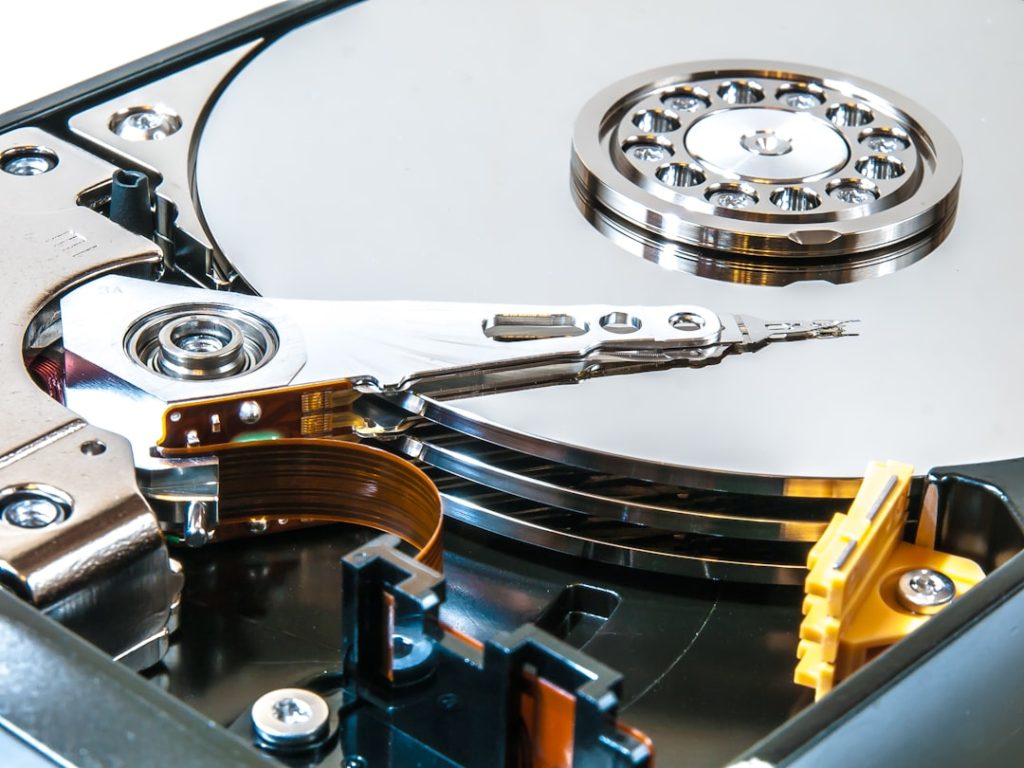
File corruption can feel like discovering a vital piece of a puzzle has been gnawed into oblivion by unseen mice. Suddenly, that intricate picture we were building, whether it’s a cherished photograph, a critical business document, or a meticulously crafted creative project, is rendered incomplete and unusable. This unfortunate scenario, where data becomes inaccessible or garbled, is a common hazard of the digital age. Fortunately, it’s not always a lost cause. We can often reclaim our lost digital treasures through deliberate and methodical approaches to corrupted file recovery.
Before we delve into the “how-to,” it’s essential to grasp what we’re up against. File corruption isn’t a single, monolithic problem; it’s a symptom of underlying issues that disrupt the integrity of the data structure. Think of a file as a carefully constructed building. Corruption means the blueprints might have been smudged, a section of the foundation might have crumbled, or the delivery of crucial building materials was interrupted, leaving the structure unstable and unfit for use.
Common Causes of File Corruption
The digital world, while powerful, is not immune to errors and disruptions. Understanding the root causes can help us prevent future occurrences and better diagnose the problem at hand.
Hardware Malfunctions
The physical components of our computer systems, from hard drives to USB drives, are susceptible to wear and tear, electronic surges, or manufacturing defects.
- Hard Drive Failures: A failing hard drive is like a road riddled with potholes; data being written or read can easily be dropped or distorted. Bad sectors, areas on the disk that cannot be reliably read or written to, are a common culprit.
- Removable Media Issues: USB drives, SD cards, and external hard drives are frequently unplugged abruptly or exposed to physical stress. This can lead to incomplete data transfers or physical damage to the storage medium, making the files stored on them vulnerable.
- RAM Errors: Random Access Memory (RAM) is a temporary workspace for our computer. If it’s faulty, data being processed can be corrupted before it’s even saved to persistent storage.
Software Glitches and Errors
Software, while designed for precision, can also be the source of data integrity issues. Bugs in operating systems or applications, improper shutdowns, or conflicts between programs can all contribute.
- Application Crashes: If an application crashes while a file is being saved or edited, the resulting file might be incomplete or contain erroneous data. It’s like a chef dropping a dish midway through preparation – you don’t get the intended meal.
- Operating System Instability: A corrupted operating system file can have a cascading effect, impacting the ability of other programs to access and write data correctly.
- Malware and Viruses: Malicious software is a well-known saboteur. Viruses and other malware can intentionally corrupt, delete, or encrypt files, making them inaccessible.
Power Outages and Unexpected Shutdowns
A sudden loss of power is akin to pulling the plug on a complex assembly line mid-operation. The consequences can be dire for data that is in the process of being written.
- Abrupt System Power Loss: When a computer loses power without a proper shutdown procedure, the operating system and applications don’t have the opportunity to finalize operations. This leaves open files in an inconsistent state.
- Surge Protectors and Uninterruptible Power Supplies (UPS): While not a direct cause, the absence of these can amplify the impact of power fluctuations, leading to more severe data corruption.
Strategies for Recovering Corrupted Files
Once we’ve identified that a file is indeed corrupted, the next step is to explore recovery options. This phase requires a systematic approach, often involving a combination of built-in tools and specialized software. It’s important to approach this as a detective would, gathering clues and trying different investigative methods.
Built-in Operating System Tools
Our operating systems offer some rudimentary tools that can sometimes mend minor data discrepancies. These are often the first line of defense.
System File Checker (SFC)
This command-line utility is designed to scan and verify the integrity of all protected system files and replace them with correct versions. While it’s primarily for OS integrity, it can indirectly help if system file corruption is contributing to broader file access issues.
- How to Use SFC: On Windows, we can open Command Prompt as an administrator and type
sfc /scannow. The tool will then scan your system and attempt to repair any corrupted files it finds.
Disk Error Checking (chkdsk)
This utility checks your hard drive for file system errors and bad sectors and attempts to repair them. It’s a powerful tool for addressing physical disk-related corruption.
- Running chkdsk: In Windows, we can right-click on the drive we suspect of corruption in File Explorer, select “Properties,” then go to the “Tools” tab and click “Check.” Alternatively, we can use the Command Prompt with
chkdsk [drive letter]: /f /r, where/ffixes errors on the disk and/rlocates bad sectors and recovers readable information.
Data Recovery Software: The Digital Rescuers
When built-in tools fall short, specialized data recovery software becomes our most potent weapon. These programs are designed to scan storage devices at a low level, bypassing the file system’s limitations to look for leftover data fragments. Think of them as forensic archaeologists sifting through the digital rubble.
Understanding How Data Recovery Software Works
These programs operate on the principle that even if a file’s index or metadata is corrupted, the actual data may still exist on the storage medium. When a file is “deleted” or a drive is formatted, the data isn’t immediately erased; rather, the space it occupied is marked as available. Data recovery software can often find and reassemble these fragments before they are overwritten by new data.
- Scanning Mechanisms: Recovery software employs various scanning methods, from quick scans that look for recently deleted files to deep scans that meticulously examine every sector of the drive for recoverable data.
- File Signature Analysis: Many tools can identify file types based on their unique internal signatures (sequences of bytes that define a file format), even if the file name or directory structure is damaged.
Choosing the Right Data Recovery Software
The market is flooded with data recovery tools. Selecting the appropriate one depends on the type of corruption, the operating system, and our budget.
- Free vs. Paid Software: Free tools often offer basic recovery capabilities but may have limitations on the amount of data that can be recovered or lack advanced features. Paid software generally provides more robust functionality, better support, and higher success rates for complex cases.
- User Interface and Ease of Use: For those less technically inclined, a user-friendly interface is crucial. Advanced users might prefer more granular control over the recovery process.
- Reputation and Reviews: It’s wise to research user reviews and expert opinions to gauge the effectiveness and reliability of different software options. Well-regarded programs include Recuva, EaseUS Data Recovery Wizard, Stellar Data Recovery, and MiniTool Power Data Recovery.
Steps to Take Before Attempting Recovery

Before diving headfirst into recovery, a few preparatory steps can significantly increase our chances of success and prevent further damage. This is akin to preparing a patient for surgery – the more thorough the pre-operative care, the better the outcome.
Stop Using the Affected Drive Immediately
This is perhaps the most critical step. Every time we write new data to a drive, we risk overwriting the very data we are trying to recover. Imagine a fragile historical document that is already deteriorating; the more people handle it, the more likely it is to crumble further.
- Preventing Overwrites: If the corrupted file is on your primary system drive (C: drive in Windows), it’s best to shut down the computer and remove the hard drive if possible, then connect it to another computer as a secondary drive for recovery. For external drives or secondary internal drives, simply unplugging them or disconnecting them from your system is sufficient.
- Impact of New Data: Even seemingly innocuous actions like browsing the internet, installing software updates, or downloading files can write temporary data to the drive, potentially corrupting the recoverable fragments.
Create a Disk Image (If Possible)
A disk image is an exact byte-for-byte copy of an entire storage device. Creating an image allows us to work on a replica of the drive, preserving the original in its current state. This is like taking a high-resolution photograph of an artifact before attempting any restoration to avoid damaging the original.
- Benefits of Disk Imaging: If the recovery process encounters errors or the drive is physically unstable, working on an image means the original drive remains untouched. It also allows us to try multiple recovery tools on the same image without repeatedly scanning the original drive.
- Tools for Disk Imaging: Various disk imaging software is available, both free (e.g., Clonezilla, Macrium Reflect Free) and paid. Specialized forensic imaging tools also exist for more advanced scenarios.
Identify the Type of File and the Extent of Corruption
Having a clear understanding of what kind of file is corrupted and how it is affected helps in choosing the right recovery tools and methods. Is it a simple document, a complex video file, or a database? How is it corrupted – is it unreadable, partially visible with glitches, or completely garbled?
- File Types and Their Susceptibility: Different file formats have varying levels of complexity and resilience. Simple text files are generally easier to recover than large, multi-layered media files.
- Error Messages: Pay close attention to any error messages you receive when trying to open the file. These messages can provide valuable clues about the nature of the corruption.
Advanced Recovery Techniques and Considerations

For more persistent or complex corruption, we may need to resort to more advanced techniques. These methods require a greater understanding of data structures and can sometimes involve professional assistance.
Using File Repair Utilities
Beyond general data recovery software, specific tools are designed to repair particular file types. These utilities are often more specialized and can be quite effective for the file formats they support.
- Video Repair Software: For corrupted video files (e.g., MP4, MOV, AVI), specialized video repair tools can attempt to reconstruct the video stream, audio stream, and metadata. These often work by analyzing the structure of intact parts of the file and using that information to mend the damaged sections.
- Document Repair Tools: Similar utilities exist for common document formats like Microsoft Word (.docx), Excel (.xlsx), PDF, and others. These can address issues like unreadable characters, missing elements, or an inability to open the file.
- Database Repair: For corrupted database files (e.g., SQL, Access), specialized database repair tools or the built-in repair functions of the database management system itself are necessary. These are highly technical and often require expert knowledge.
Professional Data Recovery Services
When all DIY efforts fail, or if the data is exceptionally valuable, professional data recovery services offer a last resort. These services employ highly skilled technicians and specialized equipment that can often recover data from severely damaged drives or highly corrupted files.
- When to Consider Professional Help: If the data is critical for business or personal reasons, and DIY attempts have proven unsuccessful or risky, engaging a professional is a wise investment. This is particularly true for physically damaged drives (e.g., dropping a hard drive).
- The Recovery Process: Professional services typically involve initial diagnosis, an evaluation of the recovery prospects, a quote, and then the actual recovery attempt in a controlled laboratory environment. They often have access to cleanrooms, specialized hardware (like platter readers and head replacement tools), and advanced software that is not available to the public.
- Cost and Time: Professional recovery can be expensive and time-consuming, ranging from hundreds to thousands of dollars, and taking days to weeks depending on the complexity of the case.
Prevention is Better Than Cure
While recovery is our focus, it’s crucial to reinforce the importance of proactive measures. The digital world is a garden, and without diligent tending, weeds (corruption) can easily take root.
- Regular Backups: This is the ultimate safety net. Regularly backing up your important files to an external hard drive, cloud storage, or a network-attached storage (NAS) device ensures that even if a file becomes corrupted, you have a pristine copy readily available.
- Safe Ejection of Devices: Always use the “Safely Remove Hardware” or “Eject” option before unplugging USB drives or external hard drives. This ensures all data transfer operations are completed before the device is disconnected.
- Antivirus and Malware Protection: Keeping your antivirus software up-to-date and performing regular scans can prevent malicious software from corrupting your files.
- Proper Shutdown Procedures: Always shut down your computer properly through the operating system’s shutdown command. Avoid force-quitting or cutting power unexpectedly.
- Monitor Hardware Health: Pay attention to any unusual noises or performance issues from your hard drive, as these can be early indicators of failure.
The path to corrupted file recovery can be winding, often requiring patience, methodical effort, and the right tools. While the threat of data loss is a constant companion in our digital lives, by understanding the causes, employing appropriate recovery strategies, and prioritizing prevention, we can significantly mitigate the risks and reclaim our invaluable digital assets.